How to Choose a Managed Service Provider: A Practical Guide for Businesses
Whether you run a small company or a growing enterprise, choosing the right IT partner can improve security, reduce downtime, and free your team to focus on core business goals. If you’re wondering how to choose a managed service provider, you’re making an important decision that can affect your operations for years.
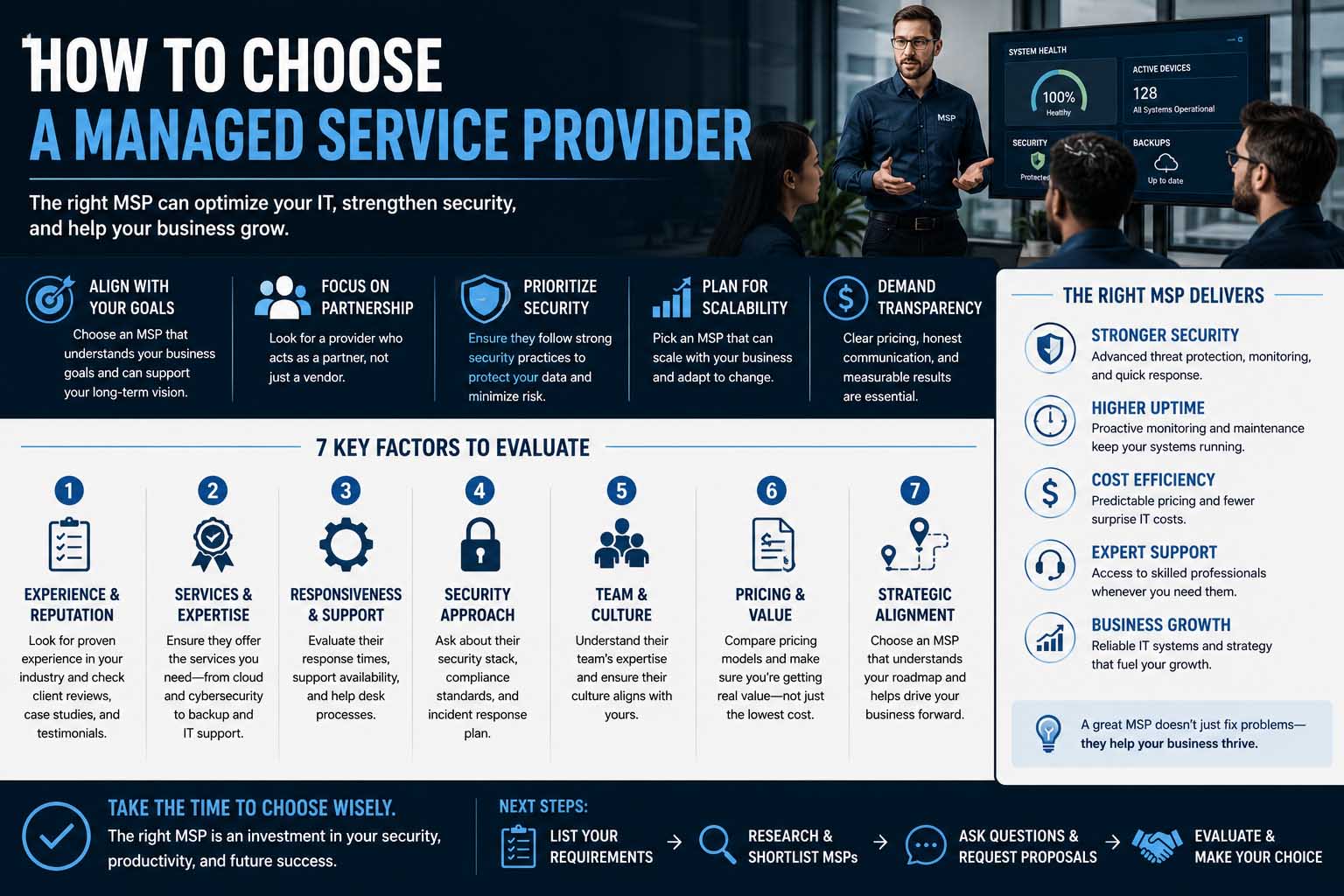
A managed service provider (MSP) is more than an outsourced IT company. The right provider becomes a strategic partner that helps maintain your systems, strengthen cybersecurity, support employees, and plan for future growth. This guide explains what to look for, which questions to ask, and how to compare providers before signing a contract.
What Is a Managed Service Provider?
A managed service provider is a company that remotely manages some or all of your organization’s IT infrastructure and technology services.
Depending on your needs, an MSP may handle:
- Network monitoring
- Cybersecurity
- Cloud management
- Data backups
- Help desk support
- Software updates
- Device management
- Disaster recovery
- IT consulting
Instead of waiting for problems to happen, most MSPs use proactive monitoring to identify and resolve issues before they disrupt your business.
Why Businesses Work With Managed Service Providers
Hiring an in-house IT department isn’t practical for every company. A managed service provider gives businesses access to experienced professionals without the expense of building a large internal team.
Common benefits include:
- Predictable monthly costs
- Around-the-clock monitoring
- Better cybersecurity
- Access to specialized expertise
- Faster issue resolution
- Improved system reliability
- Easier technology planning
Many companies also combine MSP support with broader Managed IT Support Services to create a more resilient technology environment.
How to Choose a Managed Service Provider Based on Your Business Needs
The first step is understanding what your business actually requires.
Every company has different priorities.
Ask yourself:
- How many employees need support?
- Do you have multiple office locations?
- Are most employees remote?
- Do you use cloud applications?
- Are there industry compliance requirements?
- What technology problems occur most often?
Your answers will help narrow your search before you compare providers.
Define Your IT Goals
Avoid choosing an MSP simply because another business recommends them.
Instead, identify your objectives.
Examples include:
- Reducing downtime
- Improving cybersecurity
- Supporting business growth
- Migrating to the cloud
- Replacing aging infrastructure
- Meeting compliance requirements
Clear goals make it easier to evaluate whether an MSP offers the right expertise.
Services Every Good MSP Should Offer
Not every provider delivers the same level of service.
Look for core capabilities such as:
- 24/7 monitoring
- Endpoint protection
- Data backup and recovery
- Patch management
- Network management
- Security monitoring
- Help desk support
- Cloud services
- Vendor management
- Strategic IT planning
Some businesses only need basic technical support, while others require a complete outsourced IT department.
Evaluate Experience in Your Industry
Industry knowledge matters.
Healthcare providers, financial institutions, manufacturers, legal firms, and retailers all face different technology challenges.
Ask prospective providers:
- Have you worked with companies like ours?
- Can you provide relevant case studies?
- Do you understand industry regulations?
- What security standards do you follow?
Experience reduces onboarding time and improves service quality.
Review Security Capabilities
Cybersecurity should be one of your highest priorities.
Ask providers about:
- Multi-factor authentication
- Endpoint detection
- Email security
- Firewall management
- Employee security training
- Vulnerability assessments
- Incident response plans
- Disaster recovery
A provider should explain security practices clearly instead of relying on technical jargon.
Check Service Level Agreements (SLAs)
An SLA defines what level of service you can expect.
Review items such as:
| SLA Component | What to Check |
|---|---|
| Response Time | How quickly support responds |
| Resolution Time | Average time to solve issues |
| Availability | Support hours and coverage |
| System Uptime | Guaranteed availability |
| Escalation Process | How urgent issues are handled |
| Reporting | Performance reviews and metrics |
A detailed SLA helps avoid misunderstandings later.
Ask About Scalability
Your business won’t stay the same forever.
Choose a provider that can grow alongside your organization.
Questions to ask include:
- Can you support additional employees?
- Do you manage multiple locations?
- Can you integrate new software?
- What happens if we expand internationally?
Scalable services prevent costly provider changes later.
Consider Strategic IT Planning
The best managed service providers don’t just fix technical problems—they help businesses plan ahead.
Companies that also invest in IT Strategy Consulting often develop technology roadmaps that align IT investments with long-term business objectives instead of reacting only when problems arise.
Strategic planning helps businesses avoid unnecessary spending while improving operational efficiency.
Compare Communication and Support
Technical expertise is valuable, but communication is just as important.
Pay attention during the sales process.
Do they:
- Answer questions clearly?
- Respond quickly?
- Explain technical topics in plain language?
- Offer regular meetings?
- Provide proactive recommendations?
An MSP should feel like an extension of your own team.
Understand Pricing Models
Managed service providers typically charge using one of several pricing structures.
Common models include:
- Per user
- Per device
- Flat monthly fee
- Tiered service plans
- Customized enterprise pricing
A higher monthly fee may provide:
- Better security
- Faster support
- Unlimited help desk access
- More proactive monitoring
Look beyond the monthly invoice to understand the overall value.
Check Vendor Relationships
Many MSPs partner with software and hardware vendors.
These partnerships can provide:
- Better pricing
- Faster support
- Product expertise
- Early access to updates
Understanding What Is a Vendor can help you evaluate how your MSP works with technology suppliers and whether those partnerships benefit your business.
Questions to Ask Before Signing a Contract
Prepare a list of questions before selecting a provider.
Some of the most valuable include:
- What industries do you specialize in?
- How is support delivered?
- What security certifications do you hold?
- What monitoring tools do you use?
- Can you provide customer references?
- What happens if we outgrow your services?
- How often do you review our technology strategy?
- Are there any hidden fees?
The answers often reveal more than marketing brochures.
Common Mistakes When Choosing an MSP
Many businesses rush the selection process.
Avoid these common errors.
Choosing Based Only on Price
Lower costs can mean slower support or fewer included services.
Balance affordability with long-term value.
Ignoring Security
Some organizations focus only on technical support while overlooking cybersecurity capabilities.
Security should always be part of the evaluation process.
Not Reviewing the Contract
Read every agreement carefully.
Pay attention to:
- Contract length
- Exit terms
- Data ownership
- Cancellation fees
- Service guarantees
A clear contract protects both parties.
Failing to Check References
Ask current customers about:
- Response times
- Communication
- Reliability
- Technical expertise
- Overall satisfaction
Real customer experiences often provide better insight than marketing materials.
Specialized Managed Services
Some businesses need providers with expertise beyond general IT support.
How to Choose a Cloud Managed Service Provider
Organizations moving infrastructure to the cloud should evaluate providers with strong experience in platforms such as Microsoft Azure, Amazon Web Services (AWS), or Google Cloud.
When deciding how to choose a cloud managed service provider, ask about cloud security, migration planning, cost optimization, disaster recovery, and ongoing performance monitoring.
How to Choose a Managed DevOps Service Provider
Development teams often require specialized support for software deployment and infrastructure automation.
If you’re researching how to choose a managed DevOps service provider, prioritize experience with CI/CD pipelines, infrastructure as code, container technologies, monitoring, and cloud-native applications.
Providers should demonstrate measurable improvements in deployment speed and reliability.
How to Choose a Managed Print Service Provider
Although print management receives less attention than cybersecurity or cloud services, many organizations still rely on printers across multiple offices.
Businesses evaluating how to choose a managed print service provider should compare maintenance response times, supply management, printer fleet optimization, security features, and reporting capabilities.
The right provider can significantly reduce printing costs while improving efficiency.
Look for a Long-Term Technology Partner
The strongest managed service providers contribute to business growth rather than simply fixing technical problems.
Many organizations pair MSP support with Digital Strategy Consulting to ensure technology investments support broader digital transformation goals, customer experience improvements, and operational efficiency.
An MSP that understands your business strategy becomes much more valuable than one that only responds to support tickets.
Should You Choose a Local or National MSP?
There isn’t a universal answer.
Local providers may offer:
- Faster onsite visits
- Regional knowledge
- Personalized relationships
National providers often provide:
- Larger support teams
- Broader expertise
- Around-the-clock coverage
- More specialized services
Your decision should depend on your business priorities rather than company size alone.
Frequently Asked Questions
What is a managed service provider?
A managed service provider is a company that remotely manages IT systems, monitors infrastructure, provides technical support, and helps businesses maintain secure, reliable technology environments.
How do I choose the best managed service provider?
Start by identifying your business needs, comparing service offerings, reviewing security practices, checking references, evaluating SLAs, and confirming the provider can scale as your business grows.
Are managed service providers suitable for small businesses?
Yes. Many small businesses benefit from professional IT support without the cost of maintaining a full in-house IT department.
What should a managed service agreement include?
A service agreement should clearly define response times, service scope, pricing, security responsibilities, reporting, contract terms, and exit procedures.
How often should I review my managed service provider?
Most businesses should review performance quarterly or at least annually to ensure services continue meeting operational and strategic goals.
Making the Right Choice
Choosing the right MSP takes more than comparing prices or feature lists. Start with your business objectives, evaluate each provider’s expertise, verify their security practices, and review service agreements carefully. The best providers combine reliable technical support with strategic guidance that helps your organization grow.
If your company is planning major technology initiatives, involving a Business Strategy Consultant alongside your MSP selection process can also help ensure your IT investments support broader business goals. A thoughtful evaluation today can lead to a stronger, more secure, and more scalable technology partnership for years to come.